Build a New Generation of Design-Driven Applications with Cesium
Today, we are thrilled to announce our latest Cesium release, bringing a major set of CAD and BIM capabilities to production. Several foundational design workflows released earlier this year are now Generally Available (GA), including design model ingestion, importing models from Bentley Infrastructure Cloud (BIC), geolocation with new previews before tiling, and automatically generating terrain-clipping footprints with Clipping Assist. Design model querying is also moving to GA, with new capabilities to execute aggregate metadata queries, such as calculating material quantities across design elements.
Alongside these GA workflows, we’re introducing a new set of Technology Previews that unlock even deeper interaction and analysis of design models. We're introducing building BIM-style model tree navigation, improvements to version-to-version change detection to inspect, review, and collaborate across the entire project lifecycle, and precision edge snapping for measurement tools in Cesium ion SDK.
Build a new generation of design-driven applications with Cesium. Stream BIM/CAD models from Cesium ion into real-world context, and explore workflows for georeferencing, clipping, querying engineering data, calculating quantities, navigating model trees, and measuring precisely with snapping.
These updates build on the work we began earlier this year to broaden support for design formats and bring richer capabilities, including model metadata queries and change detection. Developed with feedback from the Cesium community, these capabilities are already helping organizations build applications around design data that support confident decision-making by bringing greater interactivity and intelligence to design workflows across the project lifecycle. With the release of Cesium ion MCP, these workflows can now be performed using your preferred AI tools.
From design review and stakeholder engagement to digital delivery, construction, and operations, these capabilities help teams communicate proposed changes, collaborate in shared context, and make better informed decisions as projects evolve. Read on to explore the latest additions.
Easier model preparation and integration
This summer we leveraged existing Bentley technology to add a new Cesium ion tiler for the most common BIM/CAD formats: AutoCAD, Revit, IFC, and DGN. In September, we added the ability to update design models and an API to compare versions. The BIM/CAD Tiler is now in GA, and we’re excited to see how the community adopts it for production workflows. We’re working with users to roll out final enhancements to the change detection API, with GA planned for December.
Today, we’re also excited to announce these additional GA features for managing design models with Cesium.
Position design models with confidence
Many design models are created in a real-world coordinate system, but file formats and authoring tools may omit or incorrectly configure the information that identifies which coordinate system the model uses. Without this information, the model cannot be positioned automatically and reliably.
New georeferencing workflows available soon in Cesium ion add a preview step before the model is tiled. Users can see where the model is geolocated, validate its position, and correct any issues before tiling begins.
Instead of waiting for tiling to finish only to discover that the model is in the wrong location, users can identify positioning issues earlier and proceed with greater confidence.
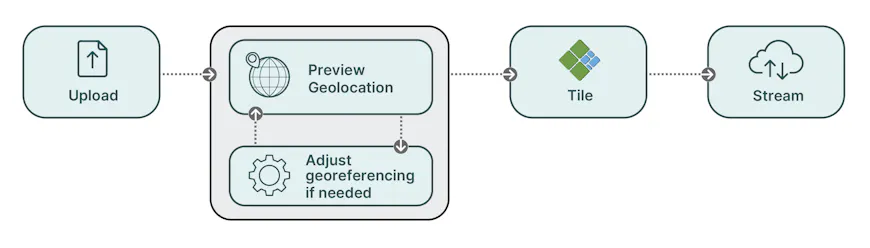
The new georeferencing workflow lets users preview and correct model positioning before tiling, avoiding time lost tiling a model in the wrong location.
Faster integration with clipping assist
Placing a design into its real-world context often requires clipping existing terrain or 3D content around the project area, often done manually by the user, taking up valuable time.
To accelerate this process, ion can now automatically generate a GeoJSON footprint from a 3D Tileset for use as a clipping polygon. Instead of creating the clipping polygon entirely by hand, users get a starting point they can review and refine, reducing the manual work required to integrate the design with its surroundings, potentially saving users hours of time.
Cesium ion clipping assist generates a GeoJSON footprint for a 3D Tileset, saving time when preparing 3D scenes.
Complement Bentley Infrastructure Cloud projects with custom Cesium workflows
Infrastructure designs often live in established but disconnected systems, making it difficult to combine them with the 3D, reality, geospatial, and business data needed for broader project workflows.
Users can now add iModels from Bentley Infrastructure Cloud to Cesium ion and combine them with these datasets in Cesium applications—without exporting or duplicating the source design.
This lets teams continue using Bentley applications for core design and delivery, while using Cesium to build custom workflows that complement those applications and address needs beyond them.
From model to metrics: an illustrative quantity dashboard in Cesium for a steel girder bridge from Bentley Infrastructure Cloud.
More powerful querying and analysis
Rich, queryable design data has long been easier to reach in vertical construction, where IFC and Revit workflows are well established. Horizontal infrastructure has been more difficult: alignments, corridors, and the nuance of civil design do not fit as neatly. The Cesium ion Asset Elements API, now in GA, is a meaningful step toward closing that gap, making engineering data queryable across supported design formats so that users can build on it in any application.
Query more of your engineering data
The API now returns more of the information behind each element. For example, IFC property sets that were previously unavailable are accessible, giving applications more of the original design information to use in queries, visualizations, and calculations.
With a more complete view of each element, applications can make greater use of the original design information across querying, visualization, and calculation workflows.
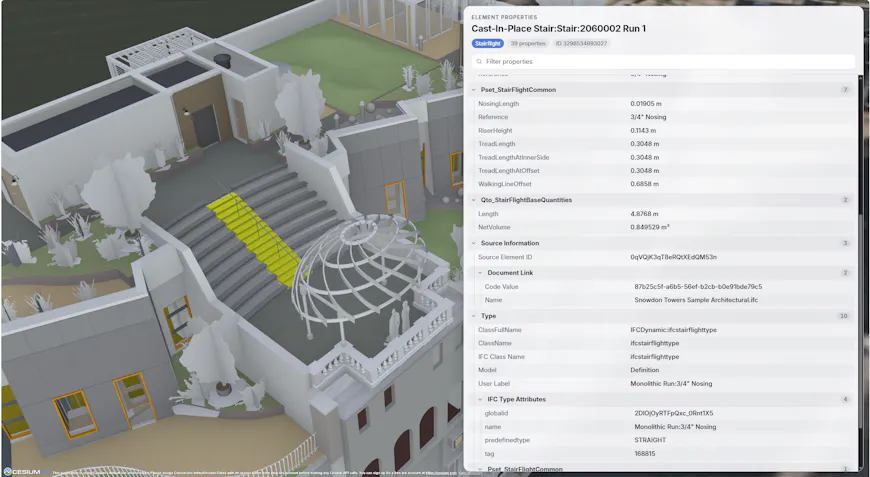
IFC type information and property sets are now available through the Cesium ion Asset Elements API. Design model from the Autodesk Revit 2025 sample library.
Calculate quantities across your model
Finding individual elements is useful, but many design workflows also need to summarize information across a model to accelerate decisions.
Queries through the Asset Elements API can now calculate the count, minimum, maximum, average, or sum of properties across matching elements. For example, an estimator could count all concrete slabs on a selected level and calculate their combined concrete volume in cubic meters. Combined with the Change Detection API, they could then limit that calculation to just the slabs added, modified, or removed between two design revisions, helping price a design change without re-measuring the entire model.
These capabilities are also exposed through the Cesium ion MCP, enabling LLM-powered tools to query and analyze engineering data in response to natural-language requests. A reviewer could ask for the total rebar weight by bar size, identify values outside expected ranges, or compare quantities between design revisions. This makes it possible to answer practical engineering questions conversationally, without building a dedicated interface for every workflow.
With the Elements API, Cesium enables developers to explore design models, ask meaningful questions, and connect engineering information to new applications, including AI-powered workflows. Because data structure and metadata vary from one model to another, the information available through the API, and the effectiveness of queries against it, can vary as well. Consistent, well-organized model data helps developers get the most from these capabilities.
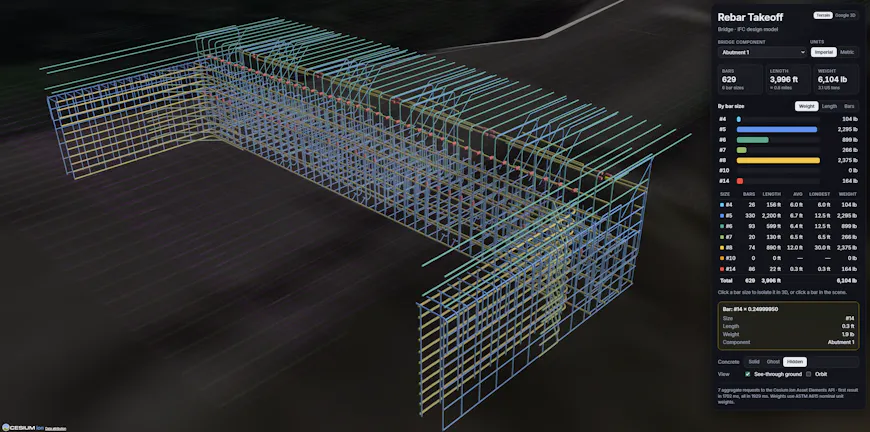
Rebar takeoff for a proposed bridge design, showing bar counts, weights, and lengths calculated using Cesium ion APIs. Model courtesy of JMT.
New tools for interacting with design models
Build familiar ways to navigate complex models with model trees
Complex design models can contain thousands of elements organized across levels, disciplines, and assemblies, making them difficult to understand through the 3D view alone.
New experimental APIs expose model hierarchy without prescribing how it must be presented, so users can build familiar BIM-style tree views organized for their application. Parent lineage and children queries also make it possible to show where a selected element sits in the model, explore the components within an assembly, and connect hierarchy-based navigation with selection and other workflows.
This gives end users a familiar way to navigate complex engineering content while allowing each application to tailor the structure and experience to its needs.
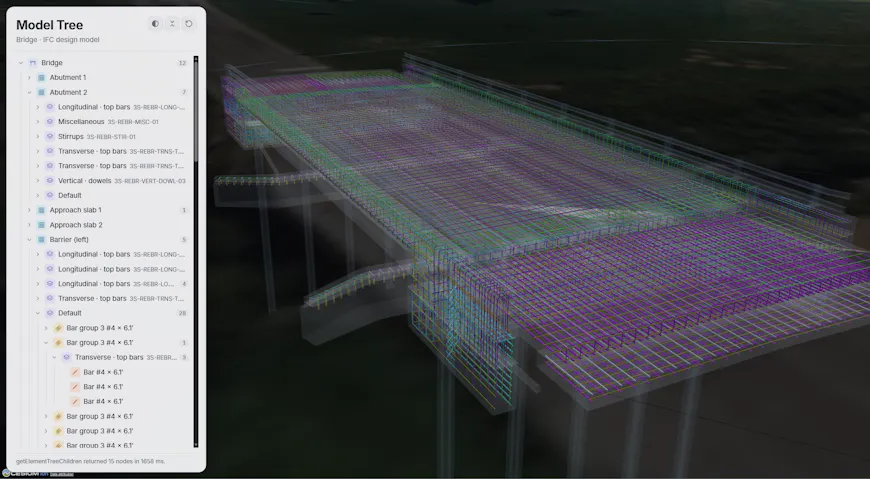
A model tree built using the new APIs, showing individual models, categories, and elements. Model courtesy of JMT.
Measure more precisely with snapping
Placing measurement points precisely on detailed engineering geometry can be difficult when users must rely on approximate pointer placement.
The measurement tools in the Cesium ion SDK are now enhanced with snapping, allowing users to place measurement points directly on edges in the model geometry.
This makes measurements more predictable and gives users greater confidence when reviewing dimensions and distances in complex design models.
The Cesium ion and CesiumJS snapping APIs are experimental while we gather community feedback.
Take precise measurements by snapping directly to engineering geometry in CesiumJS and the Cesium ion SDK.
A foundation for design-driven applications
The capabilities introduced throughout 2026 provide a strong foundation for exciting new applications across the infrastructure lifecycle, from design review and digital delivery through construction and operations. Explore the latest workflows with your own engineering models, share what you build, and continue helping us shape what comes next.
Visit our tutorials to get started and discover what you can build with Cesium.