Introducing the Cesium ion MCP Server
We’re happy to announce that the Cesium ion MCP Server is now available, enabling anyone to connect their 3D geospatial data to the AI tools they already use: coding tools like Claude Code, OpenAI Codex, Cursor, and GitHub Copilot, and general-purpose assistants like Claude Desktop and ChatGPT. AI is enabling everyone, not just developers, to build powerful 3D geospatial applications.
With the ion MCP Server, an agent in one of those tools can work directly with your Cesium ion account, using natural language to find the right dataset, check whether a model has finished tiling, or query individual elements inside a design model tiled with our new BIM/CAD tiler. And if you're a developer building an application with embedded agents, you can give them access to the MCP Server, enabling agent-driven access to your ion data and metadata for your users to work with.
A coding agent locating a Cesium ion asset and wiring it into a CesiumJS viewer, without a single hand-written REST call.
The Model Context Protocol (MCP) is an open standard for connecting AI models to external tools and data through a stable, typed interface. Open standards, including 3D Tiles and glTF, are integral to how we build at Cesium, so extending our approach to the open agentic ecosystem was a natural next step. And because we host the server, there's nothing to deploy: your tools connect directly and act on your ion data and metadata without a single REST call.
To get started, check out our documentation.
What's in the first release
This first version of the server collects the most important parts of the Cesium ion REST API into a set of tools an agent can call directly. It's a focused starting point rather than the full API surface, and we'll grow it over time based on what the community needs.
After you authenticate with your Cesium ion account, the server exposes tools to your agent to act on your behalf. You can ask an agent something like "Find the latest photogrammetry model of Philadelphia," and it will use those tools to track it down in your ion account.
The server also exposes our new Asset Element APIs, giving agents the ability to run detailed queries inside design models created with our new BIM/CAD tiler directly from ion. An agent can search for specific components (for example, "List all structural elements") and return the matches you need.
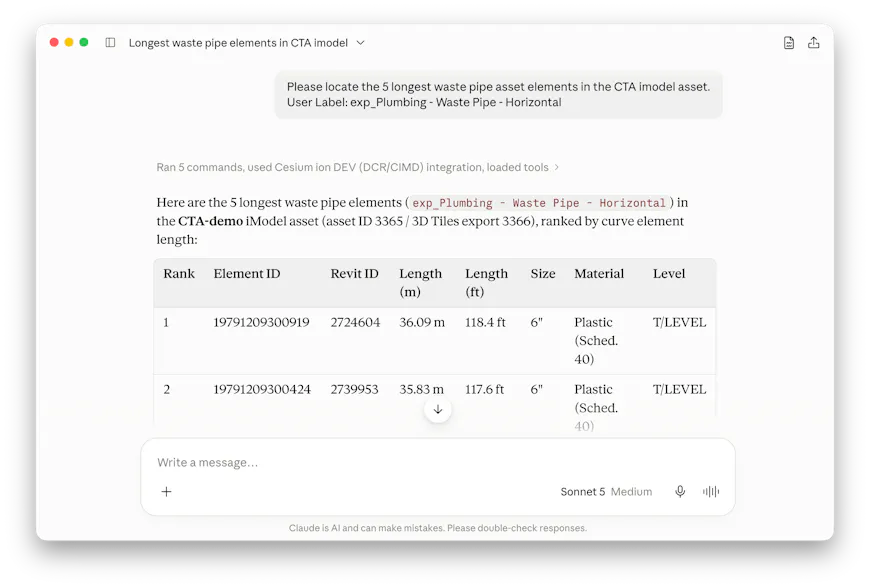
Querying asset metadata in natural language and getting back structured, ready-to-use results.
Three ways to put it to work
The ion MCP Server supports multiple workflows, depending on whether you're building software or exploring data.
Build with a coding agent. From a coding tool like Claude Code, Codex, Cursor, or GitHub Copilot, you can stay in your editor instead of leaving to look up an asset ID or poll a tiling job. Ask "Check whether the Louvre asset has finished tiling, then write the code to add it to my viewer," and the agent verifies the status, retrieves the asset ID, and writes the code for you.
Embed an agent in your own app. Give your app's built-in agents access to the same server so your users can interact with large BIM/CAD models conversationally. A user might ask, "Show me all of the pipes with the same material and cross section in my model," and the agent will use the Element API to resolve the IDs and locations for visualization.
Explore your data in a general-purpose chat assistant. Connect the server to a desktop assistant like Claude Desktop or ChatGPT and query your repository in plain language: "Show me assets tagged 'Architecture' added this month that're larger than 100 MB." No REST endpoints and no JSON to parse, just the answers you're after.
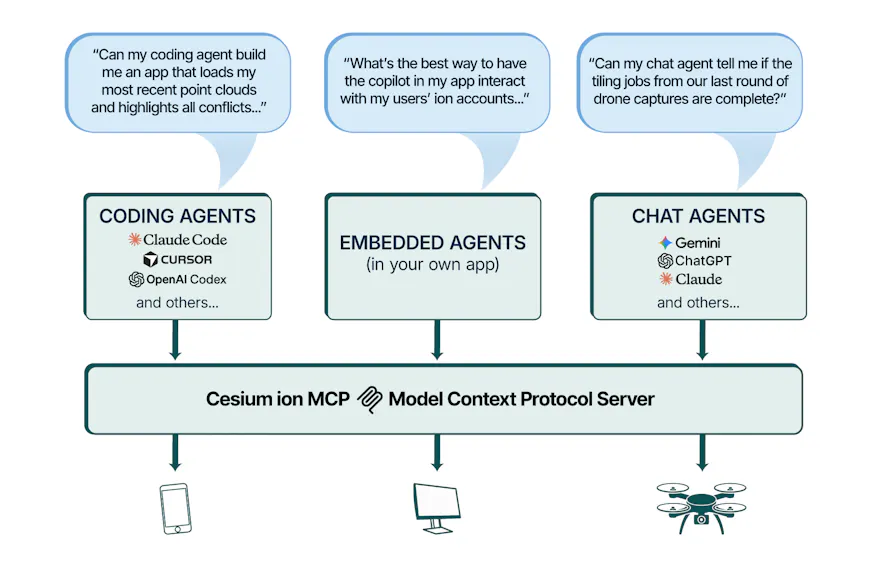
One MCP server, three workflows: building in code, embedding an agent in your own app, and exploring data in chat.
You stay in control
Every request runs through a Cesium ion account. An agent authenticates over OAuth 2.0 and acts within your existing account permissions, so it can only see the assets and take the actions you are already authorized to perform yourself. The server can take write actions such as uploads and tiling, not just reads, and instructs your agent to ask permission before performing an action that would modify your data. And as always, your data is your data; we won't use it train AI models. (See Bentley's AI policies here.)
Give us your feedback
This is our first release, and we're building it in the open with the community. Because it covers a focused subset of the API to start, your feedback will directly shape what comes next: tell us which additional tools you'd like added or what other improvements you're looking for. Share your thoughts on the Cesium Community Forum.