Geotour Showcases Crete with Synchronized Panoramas and Video in CesiumJS
Manolis Nikolakakis is a photographer who’s extensively documented his beautiful home island of Crete. When he set out to create a better way of sharing his photos, he ended up developing an entire site dedicated to Crete’s cultural and environmental heritage. Geotour.gr integrates numerous external systems to amass historical, architectural, and environmental information about the island, all organized around a CesiumJS model of Crete.
Geotour aggregates data from numerous sources to foster a better understanding of Crete, all spatially organized around a CesiumJS model of the island. Courtesy Geotour.
Manolis built Geotour with help from AI, which allowed him to integrate numerous systems and dynamically fetch data for an up-to-date understanding of Crete. The site’s 3D map of Crete, created in CesiumJS, allows visitors to access all sorts of insights about the island.
Geotour uses WordPress as a headless CMS, from which it dynamically fetches points of interest, such historical sites. Cesium parses the JSON to instantiate entities on the map, giving visitors information such as a town’s history, attractions, and population. Manolis is able to update content in the CesiumJS view by editing the associated WordPress post. The interactive CesiumJS viewer similarly allows visitors to explore live data about local flora and fauna via an integration with iNaturalist, archival materials about historical sites via an integration with SearchCulture.gr, and photos taken across the island via an integration with the Piwigo photo gallery.
“CesiumJS fits naturally into an open, API‑driven workflow. I can bring in data from WordPress, PostGIS, and open source tools and immediately see everything come together spatially. CesiumJS makes it easy to experiment and iterate quickly, which is essential when you’re building alone and exploring new ideas.”
- Manolis Nikolakakis, Creator Geotour
A CesiumJS viewer provides the spatial index for visitors to explore Crete. Courtesy Geotour.
Manolis has taken gorgeous photos all over Crete and has implemented an intuitive way of viewing spherical panoramas in CesiumJS. (At the time, bringing panoramic photos into CesiumJS was not trivial. Last month, CesiumJS added support for panoramic images.)
When visitors to Geotour navigate to a location on the island where a panoramic photo has been geotagged, an icon indicates there is a panoramic image. Clicking on the icon pulls up a Pano2VR player. The Pano2VR player is treated as a camera overlay tied to the Cesium camera, and it tracks the user's location in the background. When a user exits a photo, the Cesium camera instantly snaps to match the user's exact 2D viewing angle, keeping the transition thoroughly in sync.
Visitors to Geotour can transition smoothly between panoramic photos taken around Crete and a 3D model of the island. Courtesy Geotour.
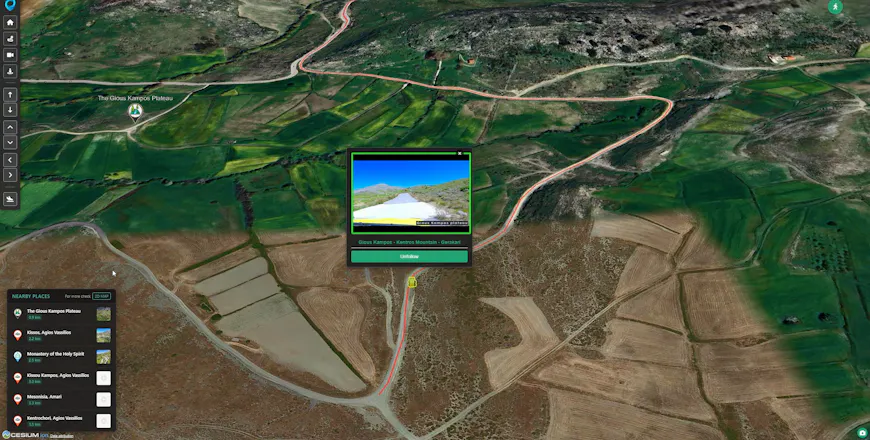
Geotour offers a similarly tight connection between the CesiumJS view and video tours created using drone or vehicle-mounted cameras. In the videos, timecodes are mapped to geospatial coordinates. By integrating CesiumJS and the YouTube IFrame player API, Manolis synchronizes the linear video with 3D movement on the CesiumJS map.
Each video plays in a pop-up window on the virtual map. As the video plays, the Cesium camera moves along the road or drone path in the 3D environment, keeping the user's Cesium perspective synchronized with the video footage. Clicking ahead in the video or to a new location on the map will automatically sync visitors to the correct position in the other window, allowing them to explore the video by geolocation or to see the geolocation based on the video.
In Geotour, video timestamps are synced to geographic coordinates so viewers can spatially explore video tours of the area. Courtesy Geotour.
Geotour has much more to offer, and Manolis has documented his process extensively, so whether you are interested in exploring Crete or in enhancing your use of CesiumJS, Geotour is well worth a visit. Check out our CesiumJS tutorials for guidance on working with the camera, displaying panoramic imagery, or creating entities.