Introducing Panoramic Imagery in CesiumJS
We’re excited to add support for panoramic imagery in CesiumJS, enabling developers to add high-resolution 360° panoramic imagery from sources like Google Maps into their 3D geospatial applications. Viewed in a 3D scene and combined with other 3D assets, panoramic imagery provides immediate geospatial context, making the ground‑level scene easier to understand, navigate, and relate to surrounding terrain and assets.
This CesiumJS sandcastle shows how to include a panoramic image in a CesiumJS app.
Use Google Street View
Google Street View contains a vast global resource of panoramic imagery. We created a helper class to load panoramic Google Street View images from anywhere in the world directly into a CesiumJS scene. This helper class is used in the sandcastle example below. Google Maps also makes available a Street View availability layer, which is included in the example to indicate where Street View imagery is available for loading.
This CesiumJS sandcastle shows how to include a panoramic image from Google Street View in a CesiumJS app.
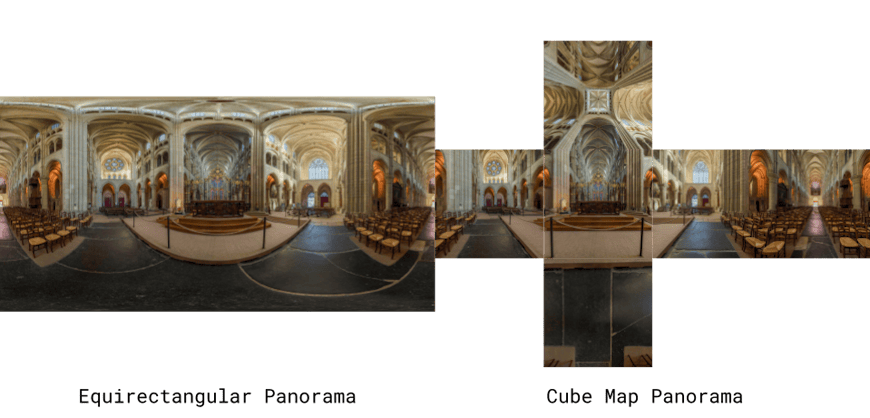
A panoramic image in equirectangluar format and cube map format. Photo by David Iliff. License: https://creativecommons.org/licenses/by-sa/3.0/.
CesiumJS supports bringing your own panoramic imagery to render within a scene, as well as loading panoramas from external providers such as Mapillary. In the example below, panoramic images were captured alongside LiDAR point cloud data using a mobile mapping system, and CesiumJS allows both datasets to be visualized together in the same 3D scene.
A CesiumJS scene featuring a panorama image aligned with a LiDAR point cloud, courtesy of Bentley iTwin Capture.
Get started
Ready to enhance your 3D scenes with high-resolution, geospatially accurate panoramic imagery? Check out the tutorials on displaying panoramic images and using Google Street View to get started.